Voyage Costs Tab
Last updated: November 4, 2025
The Costs section provides a detailed breakdown of all estimated and live voyage expenses including freight, fuel, and vendor services allowing users to track cost variance and overall performance for each voyage.
Each cost category is automatically calculated based on voyage duration, barge rates, and any associated vendor costs.
Costs Summary
At the top of the page, you’ll find the voyage summary with three key metrics:
Total Cost: Displays both the Live Estimate (actual costs so far) and the Initial Estimate (planned costs before voyage execution).
Variance: Shows the total difference between the initial and live estimates.
Duration: Reflects the total voyage time, automatically calculated from departure and arrival timestamps.
Cost Categories
Freight Cost
Lists all freight-related expenses, typically driven by daily barge or tugboat rates and voyage duration.
Rate/Type: Rate applied (e.g.,
$2,000/day)Initial Qty: Estimated days or hours from the initial plan
Live Qty: Actual recorded duration from live voyage data
Variance: Displays the cost difference between the two
Example: If a barge completed the voyage in 1.3 days instead of 3.6 days, the variance shows the reduction in total cost.
Fuel Cost
Displays fuel consumption-based expenses when tracked.
Consumption Rate: The rate used for calculating cost per day or per gallon.
Live Qty (Days): Actual consumption duration.
If fuel tracking isn’t enabled for a voyage, this section will display $0.00.
Vendor Costs
Captures additional charges such as fleeting, inspections, or third-party services.
Service: Vendor service type (e.g., Fleeting)
Unit Cost / Qty: Amount and frequency charged
Total Cost
Summarizes all categories combined and includes per-barge and per-ton cost metrics for easy comparison across voyages.
Per Barge: Divides total cost by number of barges in the voyage
Per Ton: Divides total cost by total cargo weight
Interpreting Variance
Variance values indicate performance efficiency:
Green (positive): Actual cost is lower than estimated.
Red (negative): Actual cost exceeded the estimate.
These variances are automatically recalculated as voyage data update such as changes to voyage duration, barge assignments, or vendor charges.
Example
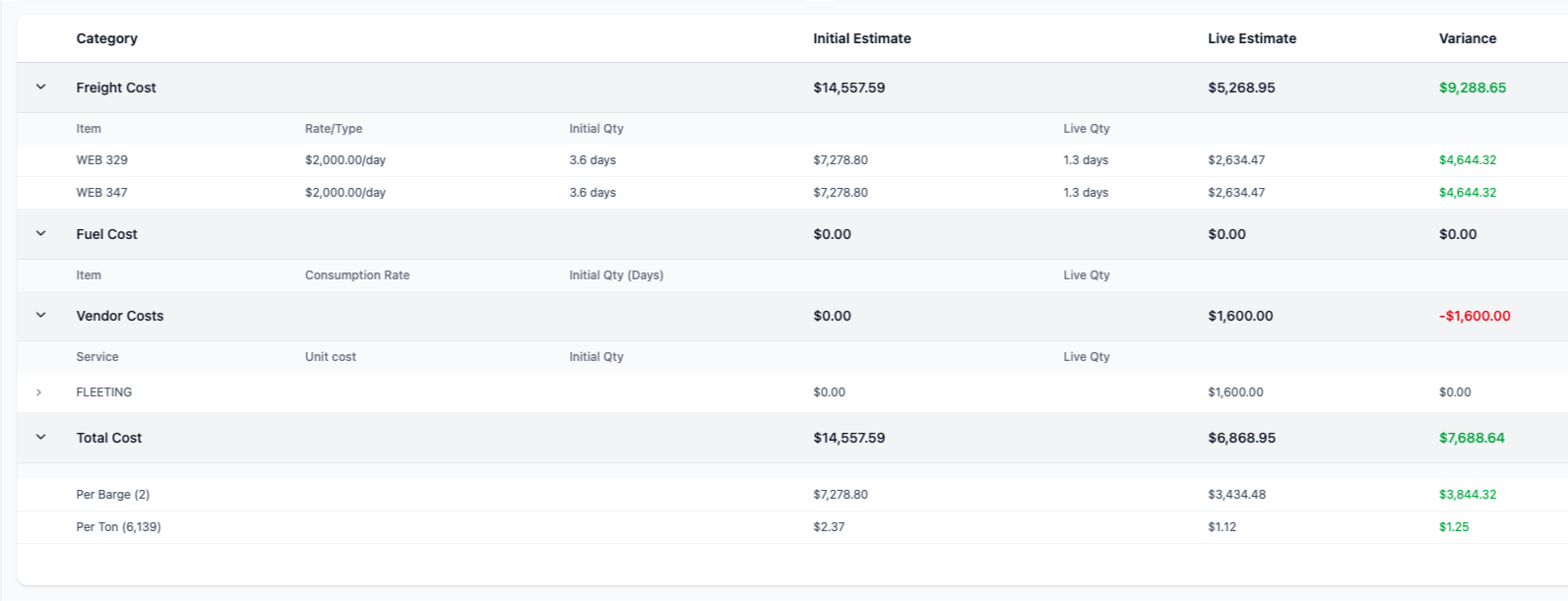
In the screenshot above, two barges (WEB 329 and WEB 347) were each billed at $2,000/day.
Estimated duration: 3.6 days
Actual duration: 1.3 days
Result: $9,288.65 saved versus the initial plan.
A $1,600 fleeting charge was added under Vendor Costs, creating a final total of $6,868.95 against an initial estimate of $14,557.59.